
Emperor Reborn
Emperor Reborn is a free, open-source launcher that runs Emperor: Battle for Dune (Westwood, 2001) on modern Windows, tested on Windows 11 and expected to work on Windows 10, with real 16:9 widescreen, fullscreen scaling and working multiplayer.

Download the latest release | Source on GitHub | Install guide
Verify your download
Every release is checksummed so you can confirm a download is the real build and not a tampered copy with something slipped in. These are the official SHA256 hashes for the latest release, served over HTTPS from this site. If a copy you got from anywhere does not match, do not run it.
Check the zip in PowerShell with Get-FileHash .\EmperorReborn-v2.5.zip -Algorithm SHA256 (or
certutil -hashfile EmperorReborn-v2.5.zip SHA256) and compare it to the hashes below. Each zip also
carries a SHA256SUMS.txt listing the two executables, so you can verify those after extracting.
zip                d029a9c0820b91855504066705fd95ae51cddcfab0a5df6aad4a336a6875fd81
EmperorReborn.exe  a8e306c4a01e77a6e3f541ad106fd9574a799b8263c2f66b277398adc6e82830
EmperorHooks.dll   9b4378738e1e404782dfaec9f5e8a1bb6d5dcc75d976468f5f82dbd3f5f37c0b
Antivirus false positive
Some antivirus engines flag the download as a trojan. It is a false positive, and here is exactly why.
The launcher injects a small DLL into the game to patch its DirectX 7 renderer at runtime, that is how the widescreen and HUD fixes work, and the exe is not code-signed. Runtime DLL injection into another process is also something malware does, so heuristic and machine-learning scanners flag it on the pattern of what it does, not on any actual malicious code, because there is none.
The detection names give the game away. They are all generic, things like Gen:Variant,
Win32:MalwareX-gen, Mal/Generic-S and Malicious (moderate confidence). Not one of them names a
real malware family with a known payload, which is what you would see if this were genuinely infected.
The count also looks bigger than it is because many of those engines share one scanner, the single
BitDefender Doris detection alone shows up under seven different vendor names.
You can see the full report for the current release here, VirusTotal report for EmperorReborn-v2.5.zip.
You do not have to take my word for any of this. The entire source is on
GitHub. Read it, and if you would rather not trust my
binary at all, compile your own EmperorReborn.exe from source with the included package.ps1 build
script and run that instead. Nothing is hidden, there are no closed blobs, and a clean build from the
public source is something no real trojan could offer.
Why this exists
I wanted to play Emperor again on my Windows 11 machine and hit the usual wall. The old installer fights modern Windows, and even once it runs the game sits in a small box in the middle of the monitor. Multiplayer has been dead since Westwood Online shut down years ago.
Tom Mason (wheybags) already wrote a patch that solves the hardest parts, getting the game to install and launch cleanly without the original disc check. I started from his work and added the few things I personally wanted on top, then wrapped it in a launcher so you do not have to touch the registry.
What I added on top of wheybags’ patch
True widescreen (16:9). This is the big one. Emperor was built for 4:3, and every other way of running it wide just stretches the picture fat or crops the top and bottom off. This one actually widens the view, pick a 16:9 resolution and the battlefield renders at the real aspect, no stretching, no black bars. The harder half was the interface, and it is done too, the in-game sidebar, the cursor, edge scrolling and the menus all sit where they should at 16:9. The in-game sidebar/HUD half builds on Moro’s widescreen patch, shared freely in the Emperor community on Discord and used with thanks; the camera widening and the front-end menus, star map and briefings are mine. As far as I can tell nobody had pulled off real widescreen on this game, the whole interface included, in the 25 years since it came out.
Read how I got the widescreen working, including the last bug that nearly beat me.


Fullscreen scaling. Pick a resolution and it fills the monitor instead of pillarboxing. On a 4K screen the game looks like a real fullscreen game again instead of a postage stamp.
Big, readable UI on a 4K screen (upscale modes). Rendering at full 4K makes the menus, fonts and tooltips tiny, the game’s interface is fixed-size art and does not scale up, so the higher the resolution the smaller it gets. The new “Upscale 4K”, “Upscale 2K” and “Upscale 1K” presets fix that the same way dgVoodoo does, the game renders at a lower resolution and the whole frame is then stretched up to fill your screen, so everything including the text gets bigger and stays easy to read. Your Windows desktop is left at its native resolution the whole time, nothing is switched or rearranged. The difference from dgVoodoo is that this is built straight into the launcher, there is no separate wrapper to install or configure, and it works together with the widescreen and HUD fixes out of the box. The number is the render resolution, not your screen, so pick the tier at or below your monitor. A lower number renders smaller for a bigger, softer UI, a higher number is sharper with a slightly smaller UI. On a 4K monitor “Upscale 2K” is the sweet spot.
Cutscene movies kept at 4:3. The FMV cutscenes were made for 4:3, so stretching them across a 16:9 screen makes everyone look fat. By default they now play at their original 4:3 aspect with black bars at the sides, the way they were meant to look. There is a launcher tickbox if you would rather turn the bars off and stretch the movies to fill the screen.
Pick your resolution in the launcher. 16:9 widescreen (1280x720, 1600x900, 1920x1080, 2560x1440), the big-UI upscale modes above, the original 4:3 modes (640x480 up to 1152x864), or match the desktop. It defaults to 1280x720 widescreen now. The choice is saved between runs.
Connect by hostname or DDNS in multiplayer. Type something like yourname.duckdns.org instead
of a raw IP. Home connections rotate their public IP, and I got tired of looking it up and sending
friends a new number every time. A DDNS name stays put.
No VC++ Redistributable needed. The C runtime is linked in statically, so there is nothing extra to
install. You run two files, EmperorReborn.exe and EmperorHooks.dll, plus your own EM109EN.EXE on
first setup.
Install
You need three things,
- The English version of Emperor: Battle for Dune (the 4 CDs, or 4 ISO images you can mount)
- EA’s official v1.09 patch,
EM109EN.EXE(free patch, still floating around the usual archives; I do not ship it, it is EA’s) - This launcher
Then,
- Put
EmperorReborn.exe,EmperorHooks.dll, and your ownEM109EN.EXEin one folder. - Run
EmperorReborn.exe. The first run asks for each disc in turn (Disc 1, then Atreides, Harkonnen, Ordos) and builds its own clean copy of the game. It does not touch or need an existing install. - Pick a resolution, tick Fullscreen, hit Play.
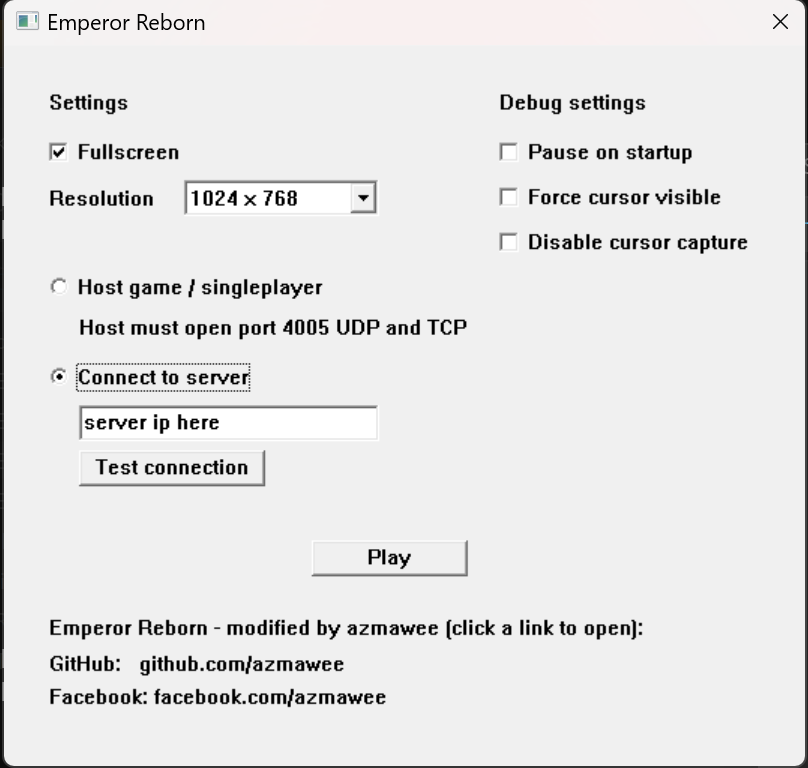
First-run setup is a one-time thing. After that it goes straight to the launcher. Full step by step is in the install guide.
Multiplayer
Westwood Online is gone, so this uses direct IP.
- The host picks Host game / singleplayer and forwards port 4005 (UDP and TCP) on their router.
- Everyone else picks Connect to server and types the host’s IP, hostname, or DDNS name.
- Hit Test connection only after the host has clicked Play.
- In game, Multiplayer, pick a username and an 8-character password, Login, Custom. Host clicks Host, others click Refresh if the game does not show up. Pick Deathmatch or Co-op Campaign, everyone Accept, host clicks Play.
DDNS only keeps the address stable. You still have to forward the port yourself.
On a 4K monitor
Do not use the “Desktop (match screen)” option on 4K. It renders at full 4K and the original fonts and tooltips end up too small to read. Use one of the upscale modes, which render lower and stretch up to fill the screen so the text stays large, and leave your desktop at 4K the whole time,
- Upscale 2K, big UI is the sweet spot on a 4K screen, large readable text and a good balance of sharpness.
- Upscale 1K, big UI if you want the biggest UI and do not mind it being a little softer.
- Upscale 4K, big UI if you want it sharper and do not mind a slightly smaller UI.
If you would rather not upscale at all, a plain 1280x720 (widescreen) + Fullscreen also keeps the text readable by switching the display mode and letting the monitor scale it.
If it still sits in a small box, your GPU is set to “no scaling”. Set scaling to Full-screen in your GPU control panel (NVIDIA Control Panel under Adjust desktop size and position; AMD and Intel have the same thing under a different name). On AMD handhelds like the ROG/Xbox Ally, the setting that works is GPU scaling off, scaling mode set to preserve aspect ratio.
Tested on
Tested on Windows 11, which is what I run it on daily. Windows 10 is expected to work, but still needs community confirmation. If you run it on Windows 10 or anywhere else and it works (or it doesn’t), open an issue and tell me.
FAQ
Does it work on Windows 11? Yes, that is what I use. No VM, no compatibility shim.
Where do I get EM109EN.EXE?
EA does not host it anymore. Search the filename, it is on the usual patch archives. Get it from a
source you trust.
Is there a GOG or Steam version? No. EA never released one. Original CDs (or your own backup images) only.
Do I need to reinstall the game?
Not if you already have a working install. Drop EmperorReborn.exe and EmperorHooks.dll into the
folder and run; if the game files are compatible it skips the disc step. People have run it over an
existing wheybags install with no reinstall. A fresh setup from discs only happens if it does not
find a compatible install.
Windows Security or antivirus is complaining. An unsigned exe trips SmartScreen, and a launcher that injects a DLL into the game trips antivirus heuristics too even though it is clean. This is a known false positive, see the Antivirus false positive section above for the full explanation. Check the download against the SHA256 first, then click More info then Run anyway. Add a Windows Security folder exclusion only as a last resort, if it keeps getting quarantined.
Is multiplayer Westwood Online? No, that shut down. This is direct IP, with hostname and DDNS support so you do not have to memorise addresses.
Does this change the game? It is the same 2001 game with all the original content. The one real change is optional true widescreen, which fixes the rendering and the interface for 16:9 instead of stretching. Want the original look? Pick a 4:3 resolution and it runs exactly like it always did. I am not remastering anything.
Is the binary safe? Yes. Some antivirus engines flag it as a false positive because it injects a DLL to patch the game, see the Antivirus false positive section for why. Source is on GitHub, build it yourself if you would rather. Each release has SHA256 hashes. Windows SmartScreen will warn about an unsigned exe from an unknown publisher, that is normal, More info, Run anyway.
Source
github.com/azmawee/EmperorReborn. MIT-0, same license as wheybags’ original.
Legal
Not affiliated with EA, Westwood, or wheybags. This is a fan preservation project.
It ships no game files. You bring your own copy and your own EA patch. The launcher patches things at runtime, it does not redistribute anything copyrighted. Emperor: Battle for Dune, Dune, Westwood Studios, and the related trademarks belong to their owners.
Built on top of wheybags’ patch. His blog post explains the hard technical parts and is worth a read. The in-game HUD widescreen patch is Moro’s work, shared freely in the Emperor community on Discord and used with thanks.